gomir


Gomir mirrors git repositories. Pronounced ‘go-meer’ (like meerkat).
Download
Download the latest release from the GitHub releases page.
Usage
Gomir mirrors Git repositories between two disconnected networks.
- The source network hosts the repositories that you want to mirror.
- The destination network hosts the mirrors of the repositories from the source network.
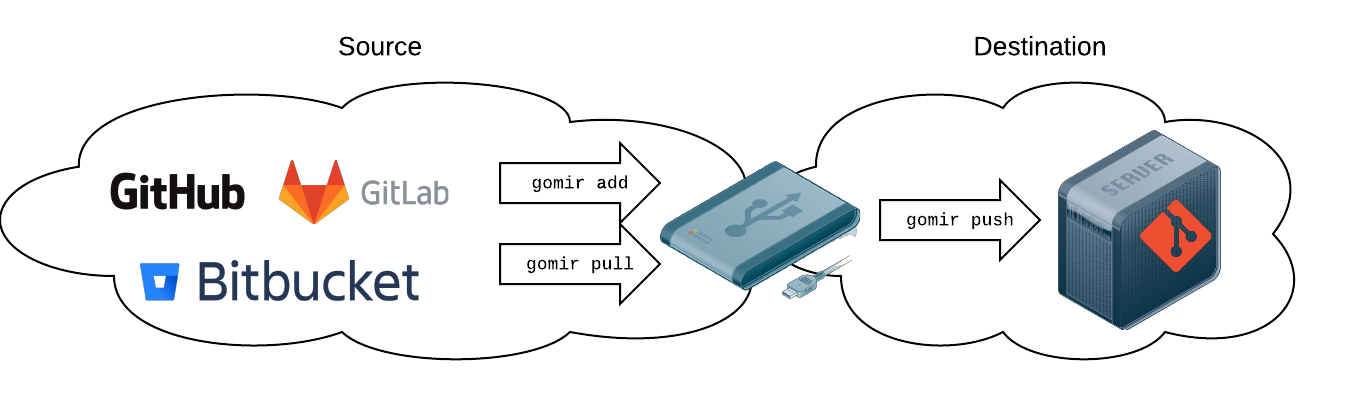
Gomir stores local copies of the repositories in the current working directory. This could be on a machine that can connect to both networks or on an USB flash drive.
Add Repositories
To get started, you must add repsistories to mirror. You do that with the add command:
gomir add <fetchURL> <pushURL> [<localDest>] [flags]
This command will fetch the repository from fetchURL and set origin’s remote push URL to pushURL. Gomir will generate a sensible localDest, but you may provide your own. The localDest specifies where the local copy of the repository is stored.
$ cd ~/mirrored-repos
$ gomir add https://github.com/blachniet/dotfiles.git file:////server/repos/dotfiles
$ gomir add https://github.com/pkg/errors.git file:////server/repos/errors
In the example above, we add two repositories to mirror. Gomir will save the local copies of these repositories in
~/mirrored-repos/github.com/blachniet/dotfiles.git/~/mirrored-repos/github.com/pkg/errors.git/
We’ve also set where we’re going to push these repositories on our destination network. In this example, we’re pushing the repositories to an SMB file share on a system named server and share named repos.
Push Repositories
Now that we’ve added some repositories to mirror, we can push them to the destination network. Make sure you’ve connected to your destination network, then run the push command.
$ cd ~/mirrored-repos
$ gomir push
[✔] github.com/blachniet/dotfiles.git
[✔] github.com/pkg/errors.git
Incorporate Updates
Occasionally you will want fetch updates from the repository that your are mirroring.
$ cd ~/mirrored-repos

# Connect to the source network to fetch updates
$ gomir fetch
[✔] github.com/blachniet/dotfiles.git
[✔] github.com/pkg/errors.git

# Connect to the destination network to push the updates
$ gomir push
[✔] github.com/blachniet/dotfiles.git
[✔] github.com/pkg/errors.git
Notes
- Gomir stores added repositories under the current working directory by default.
- The fetch/push recursively scan the current working directory for folders ending in
.git. It attempts agit fetchorgit pushin each. These operations are executed asynchronously per repository.